Use the browser where you're logged in to Facebook, with the profile that has full control of your business portfolio and Page.
What Gushwork needs
- Facebook Page: your business's public Page. Ads run from it.
- Business portfolio: holds your Page and ad account in Meta Business Suite.
- Ad account: where your ads are created and their spend is billed.
- Partner access: lets Gushwork run the ads for you.
Already have a Page, portfolio and ad account? Skip to partner access.
Gushwork's Business ID, for step 4. In Meta it shows as Regents Inc.
27981048554924933Your Facebook account and Page
5 minAds run from a Facebook Page, and a Page is managed from a personal Facebook account, so start here.
No Facebook account? Sign up at facebook.com/r.php ↗ with your real name and work email. Your profile never shows on your ads; they run from the Page.
I already have a Facebook Page
Nothing to do. Use the Page you already run. The next step makes sure it sits in your business portfolio; the Page itself stays exactly as it is.
I don't have a Page yet
- Open facebook.com/pages/create ↗ with the profile that will manage the Page.
- Enter the Page name (your business name) and pick a category.
- Click Create Page.
- Add it to your business portfolio under Settings › Pages, as shown in the portfolio step.
Have an Instagram account? Add it to your portfolio too, under Settings › Accounts › Instagram accounts, so you can tick it when you connect.
Your business portfolio
3 minA business portfolio (formerly Business Manager) holds your Page and ad account in one place.
Yes, we have one
Use it. Don't create a second one. Check that the name in the top-left menu is your business: that is where your Page, your ad account and our access all live.
No, we don't have one yet
Click the portfolio menu at the top left, then Create a business portfolio. Enter your business's public name, your name and your work email, click Create, then confirm the email Meta sends you.
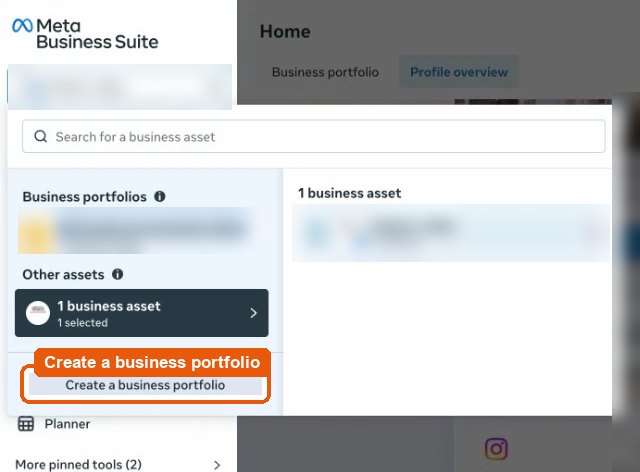
Top-left menu › Create a business portfolio. 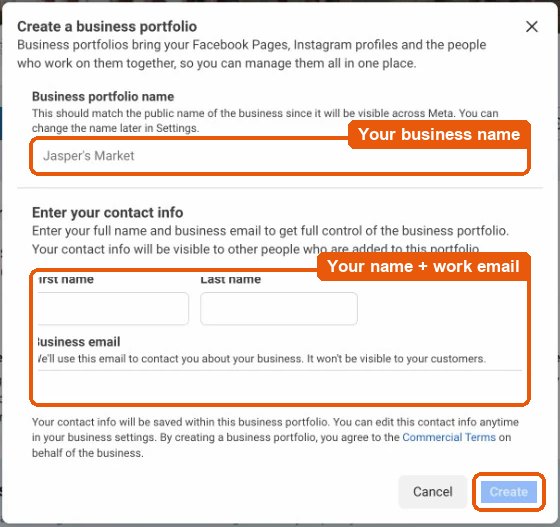
Business name, your name, work email › Create.
Then check your Page is in it.
Yes, my Page is already listed
Nothing to do. If your Page is listed here, it's already in the portfolio.
No, it isn't there yet
Click + Add, then pick the line that matches:
- Add an existing Facebook Page if you have a Page and no other business owns it.
- Request shared access to a Facebook Page if Meta says the Page belongs to another business.
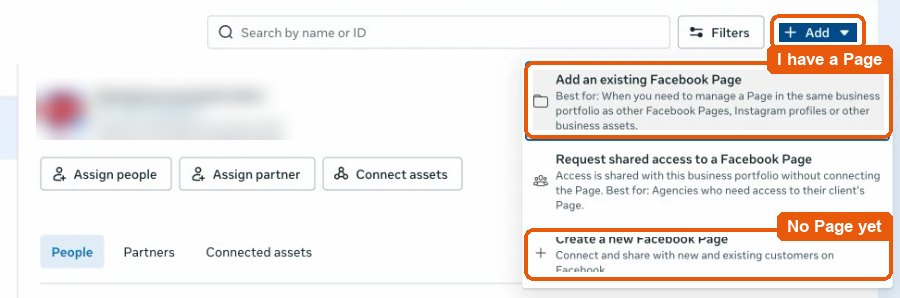
An ad account, in the portfolio
2 minYes, there is an ad account in it
Use it; don't create a new one. An account with past spend has higher Meta limits. Any currency is fine. If it isn't listed here, click + Add › Claim an existing ad account, or Request to share an ad account if another business owns it.
No, there isn't one yet
Create one with the steps below.
No ad account yet? Create one with these settings:
Currency and time zone can't be changed later. Gushwork pays and reports in US dollars on New York time, so set both exactly as above.
- In Meta Business Suite, go to Settings › Accounts › Ad accounts, click + Add, then Create a new ad account.
- Enter the name, currency and time zone above. Used for: My business. Click Next.
- Payment: see step 6. If Gushwork pays, skip it.
- Tick the terms box, then Create ad account.
More than one ad account? Share each of them in the partner step.
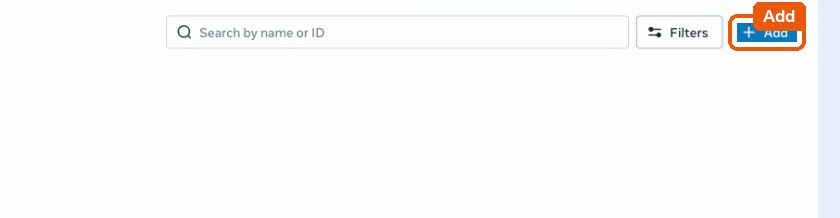
Ad accounts › Add. 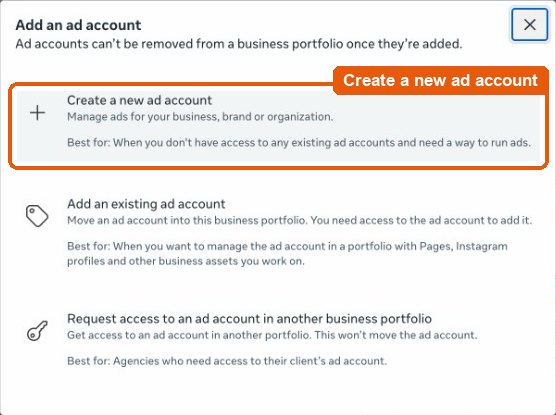
Create a new ad account. 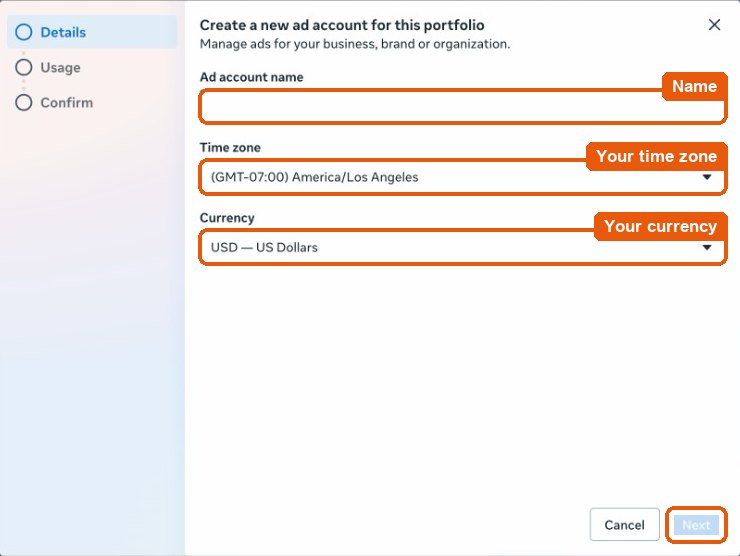
Name the account › Next. 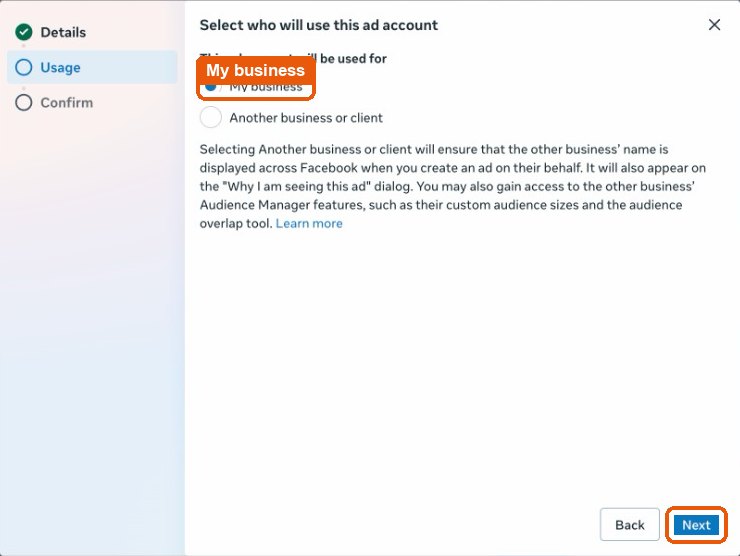
My business › Next. 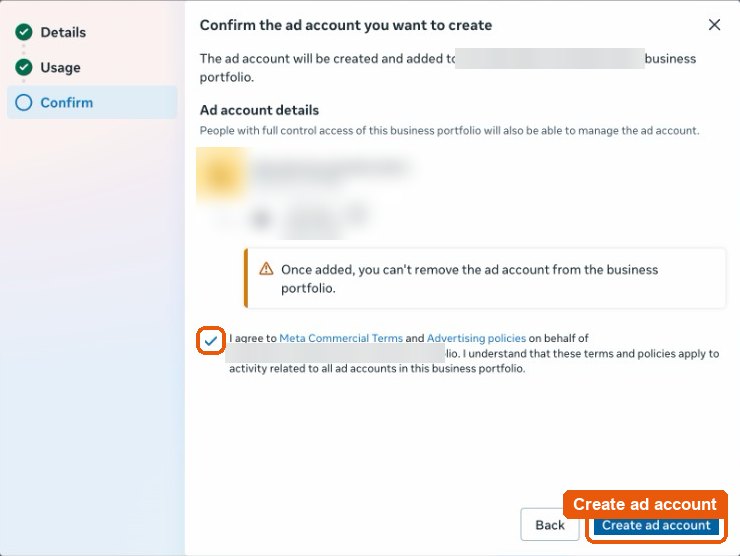
Tick the terms › Create ad account.
Give Gushwork's partner full control
4 minGushwork's business in Meta is Regents Inc. Give it full control of your Page and each ad account, with this Business ID:
27981048554924933Fastest: Page and ad accounts on one screen. Settings › Users › Partners › Add › Give a partner access to your assets, paste the Business ID, tick your Page and ad accounts with full control. Open Partners ↗ Or one at a time:
Your Page
- Click your Page, then Assign partner › Business ID (not “Get link to share”).
- Paste the Business ID.
- Under Full access, turn on Everything (except sensitive actions), then Assign.
This lets us run ads, build lead forms and collect your leads. It can't remove you or delete your Page.
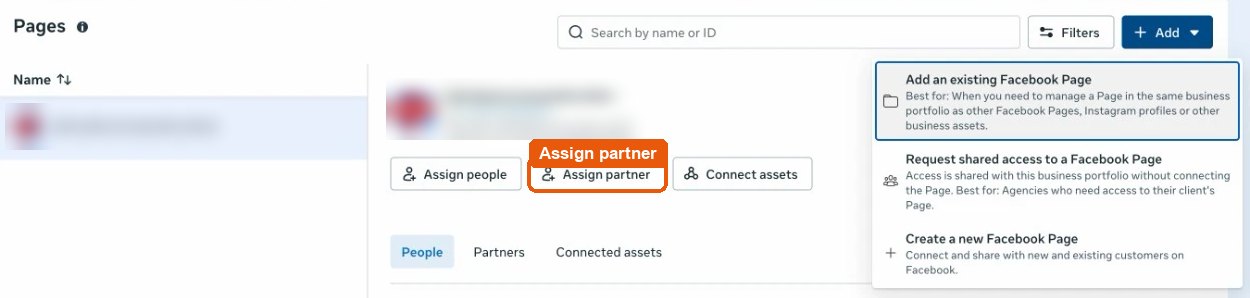
Your Page › Assign partner. 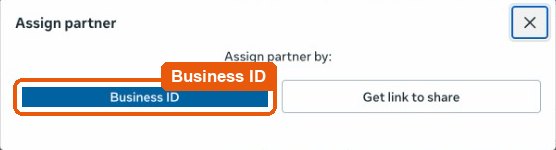
Choose Business ID. 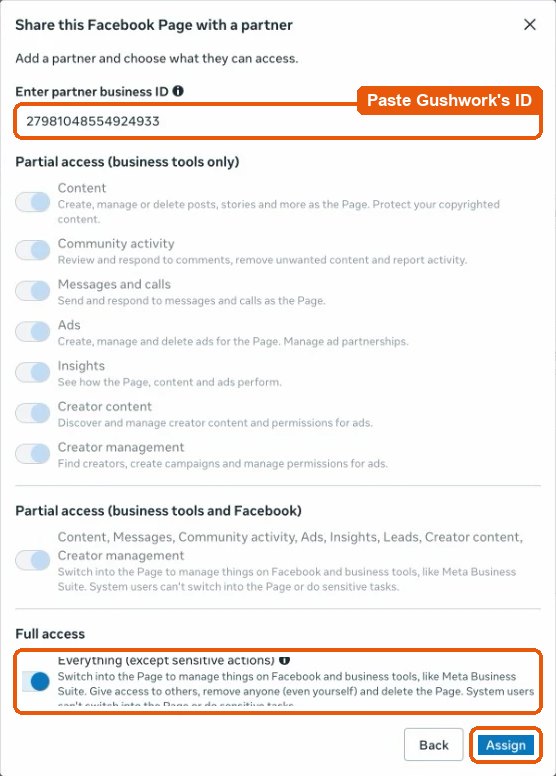
Paste the ID › Everything (except sensitive actions) › Assign.
Each ad account
- Click your ad account, then Assign partner › Business ID.
- Paste the same Business ID.
- Under Full access, turn on Manage ad accounts, then Assign.
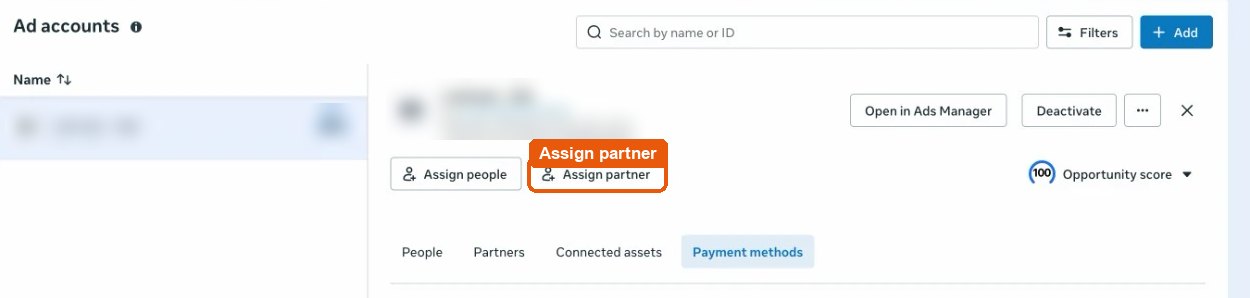
Your ad account › Assign partner. 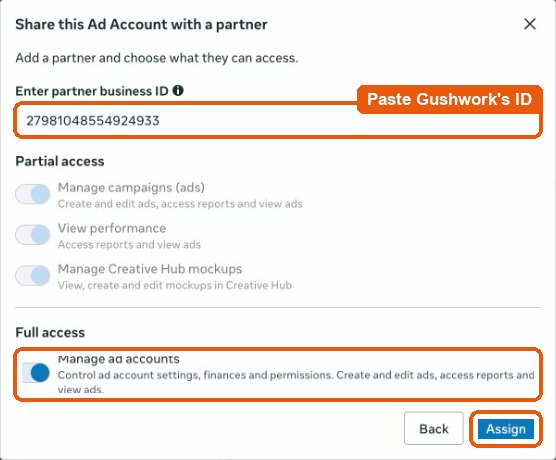
Paste the ID › Manage ad accounts › Assign.
Check it worked: Settings › Partners ↗ should list Regents Inc with your Page and your ad accounts under it.
No Assign partner button or Partners section? This profile doesn't have full control of the portfolio; ask whoever does. If Meta asks for two-factor authentication, turn it on ↗.
Accept Meta's lead ads terms for each Page
1 minMeta asks for this once per Page before any lead form can run. Only someone who manages the Page can accept it.
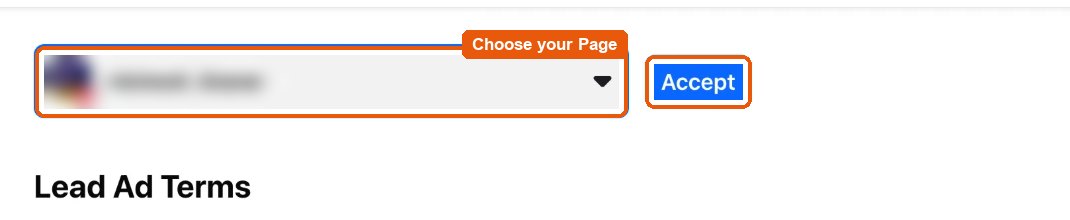
- Open Meta's lead ads terms ↗ with the same Facebook profile.
- In the menu at the top, choose your Page, not your own name.
- Click Accept. Several Pages? Repeat for each.
Payment
1 minYour agreement with Gushwork says who pays Meta for your ad spend. Ask your CSM if you're not sure.
Gushwork pays
Nothing to do. Gushwork adds its payment method to your ad account and pays Meta. Don't add a card, and skip Meta's payment step when you create the ad account.
You pay Meta yourself
Add your card to the ad account, with room for the agreed monthly budget.
- Open the ad account's Billing & payments › Payment settings.
- Click Add payment method and enter your card.
Verify your business with Meta
Optional10 min, then up to 14 daysVerified businesses get fewer blocks and better ad delivery.
Click Start verification and have ready:
- Your legal business name, address, phone and website, exactly as registered.
- If Meta asks: a business license or articles of incorporation.
Meta decides within 14 business days. Nothing else waits on it.
If something is in the way
- My Page or ad account belongs to another business, say an agency
- Nothing has to move: they can give Regents Inc access from their side. If you'd rather own it, they remove it and you add it in step 2 or 3.
- Meta won't let me create an ad account
- Meta limits new ad accounts until a payment clears on one. Use the one you have.
- I shared access but it still looks pending
- Another admin with full control may need to approve it. Once it's live, Settings › Partners lists Regents Inc with your assets under it.
- Something else, or you'd rather not do this alone
- Stuck? Contact your CSM.
All done? Gushwork checks your Meta setup and takes it from there. Stuck? Contact your CSM.
On the wrong business? Links open the portfolio you used last. If the name at the top left of Settings isn’t yours, switch it there.
Removing access later: Settings › Users › Partners › Regents Inc › Remove. See our Privacy Policy and Terms.